How to Optimize Page Speed: Complete Guide for Mobile & Desktop
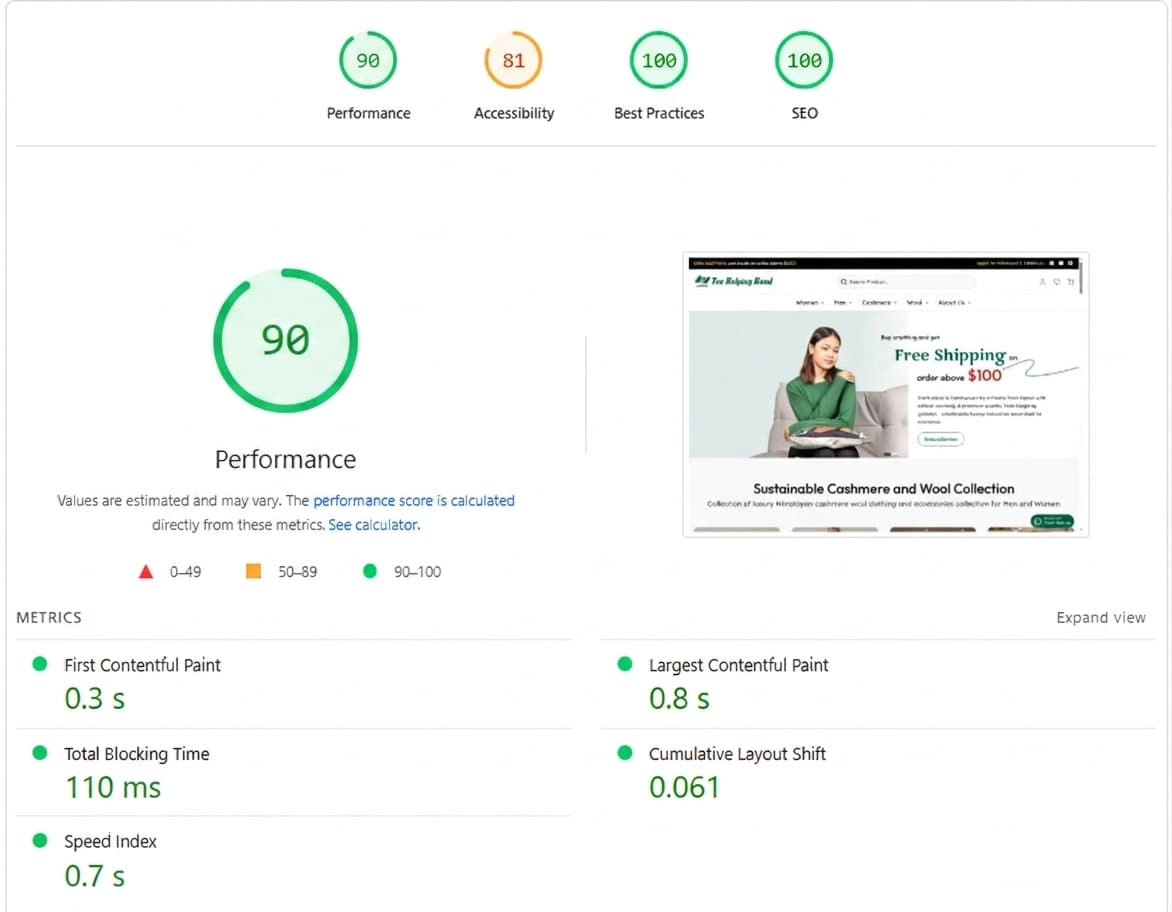
Every second counts on the web. When a visitor lands on your website, they make a judgment within moments, and if your page hasn't loaded by then, many of them are already gone.
Website page speed refers to the time it takes for a webpage to fully load and display its content to a user. It is not just a technical metric that exists in the background it is one of the most direct determinants of whether your website succeeds or fails online. Two pillars of digital success are fundamentally tied to page speed: SEO rankings and user experience.
From an SEO standpoint, Google has officially incorporated page speed into its ranking algorithm. Websites that load slowly are systematically deprioritized in search results, regardless of how well-written or relevant their content may be.
In 2021, Google introduced Core Web Vitals as a formal ranking signal, raising the stakes even further by defining specific, measurable speed thresholds that every website is evaluated against.
Why Website Page Speed Matters
Page speed is no longer just a "nice to have" it's a core part of how your website performs in both search rankings and real-world business results.
SEO Rankings
Google uses Core Web Vitals as ranking signals, so faster and more stable sites rank higher. Slow sites lose visibility even if the content is good.
User Behavior
Users often leave sites that take more than 3 seconds to load, which pushes them toward competitors.
Conversion & Revenue Impact
Slow pages reduce conversions and revenue. Even small delays can hurt sales.
Mobile-First Indexing
Google prioritizes mobile performance, so slow mobile sites can lower rankings across devices.
Key Insight:
Faster sites = better engagement, lower bounce rates, and higher conversions.
Slow sites = lost customers and weaker SEO.
How to Measure Website Page Speed
Before optimizing anything, you need a clear baseline. These are the most reliable tools to measure your current performance.
Free, easy, and directly tied to Google's ranking criteria. It gives you separate scores for mobile and desktop, along with specific recommendations. Aim for a score above 90.
Provides a detailed waterfall chart showing exactly which files are causing delays, in what order they load, and how long each takes. Ideal for diagnosing specific bottlenecks.
Lighthouse (Chrome DevTools)
Built directly into Chrome, press F12, go to the Lighthouse tab, and run an audit. Great for developers testing local or staging environments.
Common terms of website page speed:
|
Term |
Meaning |
Good Score (Google) |
|
Core Web Vitals |
Google’s metrics for speed, responsiveness, and visual stability |
All Core Web Vitals in the good range |
|
LCP (Largest Contentful Paint) |
Time to load the largest visible content |
≤ 2.5 seconds |
|
FID (First Input Delay) |
Time before the page responds to user input |
≤ 100 ms |
|
CLS (Cumulative Layout Shift) |
How much the layout shifts while loading |
≤ 0.1 |
Common Reasons for Slow Website Speed
Understanding the root causes saves you hours of guesswork.
A. Large Uncompressed Images
This is the single most common culprit. A 5MB hero image uploaded directly from a camera can single-handedly delay page load by 3–4 seconds. Compressing it to under 200KB removes that bottleneck instantly.
B. Unoptimized CSS and JavaScript
Extra code that isn't needed on a given page still gets downloaded. Unused CSS rules, multiple JavaScript libraries, and unminified files all add unnecessary weight to every page load.
C. No Caching Configured
Without caching, every single visit forces the browser to re-download all page assets from scratch, including images, fonts, stylesheets, scripts, and even for returning visitors.
D. Slow or Shared Hosting
Shared hosting puts your site on a server alongside hundreds of other websites. When server resources are stretched, your Time to First Byte (TTFB) suffers, meaning even before the browser downloads anything, it's already waiting.
E. Too Many Redirects
A redirect chain like /homepage → /old-page → /new-page forces multiple HTTP requests before the user sees any content. Each redirect adds 100–300ms of unnecessary delay.
F. No Content Delivery Network (CDN)
If your server is physically located in the USA and a visitor is browsing from Nepal, every file has to travel thousands of kilometers. Without a CDN, that distance adds significant latency to every request.
Website Speed Optimization Techniques
A. Image Optimization
Images typically account for 50–80% of a webpage's total size. Optimizing them delivers the biggest performance gain for the least effort.
Convert to modern formats: WebP images are 25–35% smaller than JPEG at the same visual quality. AVIF is even smaller but has slightly less browser support.
Before/After Example:
-
Before: banner.jpg — 2MB, JPEG format
-
After: banner.webp — 180KB, WebP format
-
Result: 91% reduction in file size, significantly faster load
B. Minify CSS, JavaScript & HTML
Minification removes whitespace, comments, and unnecessary characters from code files without changing how they function.
C. Enable Browser Caching
Browser caching tells a visitor's browser to store a copy of your static files locally. On their next visit, the browser loads those files from the local cache instead of downloading them again.
D. Use a Content Delivery Network (CDN)
A CDN stores copies of your static files on servers distributed globally. When a user requests your page, the CDN serves files from the nearest server node rather than your origin server.
Practical Example:
Your origin server is hosted in the USA. A visitor from Nepal makes a request without a CDN, every file travels across the Pacific Ocean, adding 200–300ms of latency. With a CDN node in Singapore or India, that same visitor gets files served from a much shorter distance, cutting load time noticeably.
E. Reduce Redirects
Every redirect in a chain is an additional HTTP round-trip before the browser receives any actual content.
Problem example:
example.com → example.com/home → example.com/homepage
Each arrow represents a separate server request. This adds 200–600ms before the page even begins loading.
Fix: Audit your site with Screaming Frog, update all internal links to point directly to final destination URLs, and eliminate intermediate redirect hops.
F. Enable GZIP / Brotli Compression
Server-side compression reduces the size of files transferred between your server and the user's browser.
-
GZIP reduces file sizes by up to 70%
-
Brotli offers 15–20% better compression than GZIP and is supported by all modern browsers
G. Optimize Hosting & Server Response Time
TTFB (Time to First Byte) measures how long your server takes to respond to a request before sending any data. A TTFB above 600ms significantly delays everything else.
Hosting performance ladder:
-
Shared hosting — slowest, cheapest, fine for low-traffic sites
-
VPS hosting — dedicated resources, much better TTFB
-
Managed cloud hosting (e.g., Kinsta, Cloudways, Vercel) optimized for performance, best for business-critical sites
For dynamic sites (WordPress, custom CMS), add object caching with Redis or Memcached to avoid repeated database queries on every page load.
More Techniques to Improve Website Speed
Lazy Loading
Defers the loading of offscreen images and iframes until the user scrolls near them. Native implementation: loading="lazy" attribute on <img> tags.
Critical CSS
Inline the CSS needed to render above-the-fold content directly in the HTML <head>, then load the rest asynchronously. This eliminates render-blocking CSS and makes the page visually usable almost immediately.
Resource Hints
Tell the browser in advance what it will need:
-
preload — load critical assets early (fonts, hero images)
-
prefetch — load assets likely needed on the next page
-
preconnect — establish early connections to third-party servers (Google Fonts, CDN)
HTTP/2 and HTTP/3
Modern HTTP protocols allow multiple requests to be sent simultaneously (multiplexing), dramatically reducing the overhead of loading many small files. Most modern hosting and CDN providers support this verify yours does.
Font Optimization
Web fonts are often overlooked as performance killers.
-
Use font-display: swap to show fallback text while fonts load
-
Subset fonts to include only the characters you actually use
-
Consider system fonts for body text where the design allows
Database Optimization
For WordPress and custom CMS sites, a bloated database slows down every dynamic page request.
-
Delete post revisions, spam comments, and expired transients
-
Use a plugin like WP-Optimize for routine cleanup
-
Implement Redis object caching to reduce repeated database queries
WordPress-Specific Speed Plugins
If your site runs on WordPress, these plugins handle most optimizations without touching code.
-
WP Rocket: The most comprehensive option: caching, minification, lazy loading, CDN integration, and database cleanup in one plugin. Worth the premium price.
-
LiteSpeed Cache: Best performance if your host runs LiteSpeed servers (e.g., Hostinger, DreamHost). Free and highly capable.
-
Imagify / ShortPixel: Automatically compress and convert images to WebP as you upload them. Set and forget.
-
Cloudflare: Free CDN, DDoS protection, and performance features. Works independently of your hosting.
Common Mistakes to Avoid
Learning what not to do is just as valuable as knowing best practices.
-
Installing too many plugins, each plugin adds HTTP requests, database queries, and JS/CSS files. Audit regularly and remove anything unused.
-
Uploading uncompressed images, a single 8MB photo from a smartphone can undo every other optimization on your page.
-
Skipping caching after launch, caching is often the single biggest performance win and takes minutes to set up.
-
Staying on cheap shared hosting, if your TTFB is consistently above 600ms, no front-end optimization will fully compensate for a slow server.
-
Ignoring mobile speed, Google indexes mobile-first. A desktop score of 90 means nothing if your mobile score is 45.
-
Not re-testing after changes, optimization is iterative. Always re-run PageSpeed Insights after each change to measure the actual impact.
Important: Never install two caching plugins simultaneously. They conflict with each other and can actually slow your site down or cause errors.
Frequently Asked Questions
1. What is a good Google PageSpeed score?
A score of 90 or above is considered Good by Google. Scores between 50 and 89 are classified as Needs Improvement, and scores below 50 are classified as Poor. Aim for 90+ on both mobile and desktop. Mobile scores are typically lower than desktop scores due to the constraints of mobile connections, do not neglect mobile optimization in pursuit of a high desktop score.
2. Does page speed directly affect SEO rankings?
Yes. Google has confirmed that page speed is a direct ranking signal, and Core Web Vitals, which are speed and experience metrics, are an explicit part of Google's Page Experience ranking system. Poor page speed does not guarantee a low ranking, but it is a consistent competitive disadvantage, particularly in niches where competing websites are well-optimized.
3. How do I fix render-blocking resources?
Render-blocking resources are CSS and JavaScript files that prevent the browser from displaying the page until they are fully downloaded and processed. To fix render-blocking CSS, inline critical styles in the HTML head and load the full stylesheet asynchronously. To fix render-blocking JavaScript, add the defer or async attribute to script tags, or move non-critical scripts to the bottom of the body element.
4. What is TTFB, and why does it matter?
Time to First Byte (TTFB) is the duration between the browser sending a request and receiving the first byte of a response from the server. It is a foundational metric because it measures the raw responsiveness of your server and hosting environment. A high TTFB delays every subsequent metric LCP, INP, and CLS are all affected downstream. Target a TTFB under 200ms. Values above 500ms typically indicate a hosting or server configuration issue.
5. Is a CDN necessary for small websites?
Not strictly necessary, but highly beneficial. Even small websites with primarily local audiences gain meaningful performance improvements from a CDN, particularly from the caching behavior that reduces server load and speeds up repeat visits. Cloudflare's free tier makes CDN implementation accessible at no cost, removing the financial barrier that once made it a larger-site consideration. For websites with any international visitors, a CDN is recommended regardless of size.
6. How often should I test my website speed?
At a minimum, test your website speed quarterly. Additionally, run a speed test after any significant change a new plugin, a theme update, a new third-party script, or a major content addition. Performance regressions happen silently and compound over time. Regular testing catches them early, before they affect your rankings and user experience at scale.