Flutter In-App Purchases and Subscriptions: A Complete Guide
A user taps "Go Pro" and expects premium features within seconds. Behind that tap, a billing system takes the payment, confirms it is genuine, and tells your app the user is now entitled to what they bought.
For Flutter teams, this is good news and bad news. One package, in_app_purchase, covers both the App Store and Google Play. But it gives you the transaction and nothing else. No paywall, no entitlement model, no expiry logic, no server. Every team building a paid Flutter app rebuilds that missing layer, and most get two or three details wrong before a customer tells them.
There is also a deadline in the room, and it has already passed once this year.
Key Takeaways
-
Google Play raises its minimum Billing Library version every 31 August. The floor is version 8 today. Miss it, and you cannot publish updates, although your live app keeps selling.
-
Subscribe to purchaseStream before you start any purchase, and keep it alive for the whole app session. Most "the user paid but got nothing" bugs start here.
-
Always call completePurchase(), including on the error and cancelled paths. On Android, an uncompleted purchase is auto-refunded after three days.
-
Verify purchases on your server, never on the device. A patched app can fake a successful purchase callback.
-
A subscription is not simply active or expired. Cancelled, grace period, and account hold each need a different response.
-
Flutter gives you no paywall. You build it, and it must carry localized prices, renewal terms, and links to your Terms and Privacy Policy, or it will fail review.
What Is an In-App Purchase?
An in-app purchase, or IAP, is how an app sells digital goods and services through the platform's own billing system: Google Play Billing on Android, StoreKit on iOS.
The store shows the payment sheet and handles payment methods, taxes, refunds, and receipts. It takes a commission, usually 30 percent, or 15 percent for small businesses and for subscriptions after the first year. Your app never sees a card number.
It is an outsourced checkout counter. You give up a cut of every sale, and in exchange you never build a payment system, never handle a chargeback, and never file a tax return in 80 countries.
When you must use it
The rule is about where the value is consumed, not what you call the product.
|
What you are selling |
Use IAP? |
|
Coins, gems, lives, energy refills |
Yes |
|
Ad removal, “Pro” unlock, extra levels |
Yes |
|
Premium tier or monthly membership |
Yes, as a subscription |
|
Physical goods, food delivery, event tickets |
No, use a normal payment gateway |
|
Real-world services such as ride-hailing, cleaning, or consulting |
No |
Getting this wrong is the single most common cause of app rejection. If the value is consumed inside the app, it goes through IAP. If the user receives something in the real world, it must not.
Check Your Play Billing Library Version First
This is the most urgent item in this guide, so it comes before the code.
Every Billing Library version gets a two-year support window. When it closes, Google Play stops accepting new apps and updates built on it. A new major version ships each year, so the minimum rises every 31 August, with an extension on request until 1 November.
|
Deprecated version |
New app & update deadline |
Extension until |
Minimum version from that date |
|
Billing 5 |
31 Aug 2024 |
1 Nov 2024 |
6 or later |
|
Billing 6 |
31 Aug 2025 |
1 Nov 2025 |
7 or later |
|
Billing 7 |
31 Aug 2026 |
1 Nov 2026 |
8 or later |
|
Billing 8 |
31 Aug 2027 |
1 Nov 2027 |
9 or later |
|
Billing 9 |
31 Aug 2028 |
1 Nov 2028 |
10 or later |
Two things stay true whichever year you read this. The floor rises on a schedule, whether or not you touched your billing code. And you never depend on the Billing Library directly, only through the Flutter plugin, so the fix is a package bump plus an SDK bump, never a rewrite.
Where this leaves you today
The Billing 7 cutoff passed on 31 August 2026, so if you are still on Billing 7, the Play Console will not accept new releases right now. The extension window runs until 1 November 2026, requested through the Policy status page. Nothing has broken for users, because published apps keep selling. What stops is your ability to publish, including the hotfix you needed today.
Three checks that tell you where you stand
1. Confirm today's minimum. Read it off the table, then confirm against the deprecation schedule and the release notes. You need to be at or above the floor, not on the newest release. Billing 9.1.0 shipped in June 2026, but Billing 8 still satisfies the current deadline.
2. Find what your app actually ships. pubspec.yaml is a wish. pubspec.lock is the truth: bash
flutter pub deps style=compact | grep in_app_purchase_android
3. Map that to a Billing version. Search the in_app_purchase_android changelog for "Billing". Every bump lands there months before Google's cutoff, so subscribe to it rather than waiting for a rejection email.
As of September 2026:
|
in_app_purchase |
Resolves in_app_purchase_android |
Bundles Billing |
Accepted by Play today |
|
^3.2.x |
0.4.x |
7.1.1 |
No, the floor is 8.0 |
|
^3.3.0 |
0.5.x |
8.0.0 |
Yes |
So this cycle the fix is one line, plus a verification step:
yaml
dependencies:
in_app_purchase: ^3.3.0 first release that reaches Billing 8
flutter pub upgrade in_app_purchase
flutter pub deps style=compact | grep in_app_purchase_android
want: in_app_purchase_android 0.5.x (Billing 8)
Reading this after August 2027, when Billing 9 becomes the floor? Run the same three checks. The version numbers move. The procedure does not.
The Android SDK floor moves with it
Every Billing major raises your build requirements. Billing 8 requires minSdk 23 and targetSdk 34, and Billing 9 moves the target to 35. Update android/app/build.gradle alongside the package bump or the build fails. Play's own targetSdk deadline falls in the same part of the year, so treat the two as one job.
One naming change worth knowing. Since Billing 8, Play Console calls "in-app items" one-time products, which gained purchase options (Buy or Rent) and offers. If a tutorial still says "in-app items", it is stale.
One-Time Purchases vs Subscriptions
|
One-time purchase |
Subscription |
|
|
Payment |
Charged once |
Charged every billing period |
|
Access |
Forever, or until consumed |
Only while active |
|
Revenue |
Spiky and front-loaded |
Predictable and compounding |
|
Complexity |
Low |
High, due to renewals, grace periods, and upgrades |
|
Good for |
Coins, ad removal, level packs |
Content libraries, cloud sync, ongoing services |
If you keep delivering value every month, sell a subscription. If you deliver value once, sell it once. Charging a subscription for something static drives refunds and gets rejected by reviewers looking for ongoing value.
The bigger difference is a question your code must answer. A one-time purchase asks "did they buy it?" A subscription asks "is it active right now?", and that answer changes without the user ever opening your app. That is why subscriptions need a server.
How Apple and Google Model the Same Thing Differently
|
Concept |
Apple App Store |
Google Play |
|
Repeatable purchase |
Consumable |
One-time product you consume |
|
Permanent unlock |
Non-Consumable |
One-time product you do not consume |
|
Time-limited unlock |
Non-renewing subscription |
One-time product with a Rent option |
|
Recurring |
Auto-renewable subscription in a Subscription Group |
Subscription → Base Plan → Offer |
|
Proof of purchase |
JWS transaction + originalTransactionId |
Purchase token + Order ID |
|
Notifications |
App Store Server Notifications V2 |
Realtime Developer Notifications via Pub/Sub |
|
Prebuilt paywall UI |
StoreKit views, SwiftUI only |
None |
The critical difference: Apple decides the purchase type when you create the product. Google decides it at runtime, based on whether your app consumes the purchase token.
That is why Play Console has no "Consumable" checkbox. Consume the token and the purchase clears, so the user can buy again, which behaves like a consumable. Acknowledge but never consume, and Play keeps it owned forever, which behaves like a nonconsumable. Calling the wrong Flutter method causes most "Item already owned" bugs.
You are building the paywall yourself
Native iOS developers get SubscriptionStoreView, a complete localized App Store-styled paywall in one line of SwiftUI. None of it is available to Flutter, and Google has no Android equivalent.
So every Flutter app builds its own paywall and takes on what those native views handle automatically: localized prices, renewal disclosure, trial eligibility, and links to your Terms or EULA and Privacy Policy. Missing those links is the most common cause of subscription rejection, so budget real design time here.
How the Flutter Purchase Flow Works, Step by Step
1. Set up products in the console
Before a single line of Dart runs, the product has to exist and be reachable.
- Google Play: create the one-time product or subscription, add a purchase option or base plan, set prices, then activate it. Upload at least one build to a track, and internal testing is enough. An app never uploaded to Play cannot query products at all.
- App Store Connect: complete the Paid Apps agreement plus banking and tax first. Until it is active, product queries return an empty list with no error. This traps a lot of teams.
- Product IDs are permanent on both stores and can never be reused after deletion. Use remove_ads, pro_monthly, coins_500. Never encode the price in the ID.
2. Listen to the purchase stream before anything else
This rule prevents the most damage. Subscribe to purchaseStream before you start any purchase, and keep it alive for the whole app session. The stream replays purchases that completed while your app was closed, so if nobody is listening, those entitlements are lost.
dart
final InAppPurchase _iap = InAppPurchase.instance;
late final StreamSubscription<List<PurchaseDetails>> _subscription;
Future<void> init() async {
storeAvailable = await _iap.isAvailable();
if (!storeAvailable) return;
// Subscribe FIRST — before querying or buying.
_subscription = _iap.purchaseStream.listen(
_onPurchaseUpdated,
onDone: () => _subscription.cancel(),
onError: (Object error) => _reportStreamFailure(error),
);
await loadProducts();
}
Future<void> dispose() => _subscription.cancel();
Call this once, early, right after WidgetsFlutterBinding.ensureInitialized(), inside a singleton service. Never inside a screen's initState.
3. Load products and handle the ones that do not load
dart
final response = await _iap.queryProductDetails({'remove_ads', 'pro_monthly'});
if (response.notFoundIDs.isNotEmpty) {
debugPrint('IAP: not found > ${response.notFoundIDs}');
}
products = response.productDetails;
notFoundIDs is nonempty far more often than people expect. The checklist, in the order that resolves it:
| Cause | Fix |
|---|---|
| Product not Active in Play Console | Activate it |
| App never uploaded to a Play track | Upload to internal testing |
| applicationId does not match the uploaded package name | Fix the flavour or build config |
| Debug build not signed with the release key | Use license testers and matching signing |
| Paid Apps agreement incomplete on iOS | Complete banking and tax |
| Product created less than a few hours ago | Wait for propagation |
Always display product.price, because the store already localized it:
dart
Text(product.price); // ✅ "₹499.00" / "€4,99" / "Rs 1,300"
Text('\$${product.rawPrice}'); // ❌ wrong symbol, wrong format, wrong number
4. Start the purchase with the right method
dart
if (consumable) {
await _iap.buyConsumable(purchaseParam: param, autoConsume: true);
} else {
await _iap.buyNonConsumable(purchaseParam: param); // also subscriptions
}
5. Handle every status, not just success
| PurchaseStatus | Meaning | What you do |
|---|---|---|
| pending | Awaiting payment, such as Ask to Buy, cash or a slow card | Show "awaiting approval". Grant nothing. |
| purchased | Payment succeeded | Verify, then grant, then complete |
| restored | Delivered by a restore or a reinstall | Verify, then grant, then complete |
| error | Failed | Show the message, then complete |
| canceled | User dismissed the sheet | Reset the UI silently, then complete |
Cancelling is not an error. Show a dialog for it and users think your app is broken.
6. Always complete the purchase
completePurchase() tells the store "I delivered the goods". Until you call it:
Android: the purchase stays unacknowledged, and Google Play auto-refunds and revokes it after 3 days. This is the number one cause of "the user paid but lost access".
iOS and macOS: the transaction stays in the unfinished queue and is redelivered on every app launch, forever. Every later attempt to buy that product ID also fails immediately, because a transaction for it is already pending. Under StoreKit 2, the plugin surfaces this as a storekit_duplicate_product_object error. The user cannot buy their way out. Only completing the stuck transaction clears it.
```
dart
if (purchase.pendingCompletePurchase) {
await _iap.completePurchase(purchase);
}
```
Call it on every terminal status, including error and cancelled. You must drain the queue.
The handler, end-to-end
```
dart
Future<void> _onPurchaseUpdated(List<PurchaseDetails> purchases) async {
for (final PurchaseDetails purchase in purchases) {
switch (purchase.status) {
case PurchaseStatus.pending:
_showAwaitingApproval(); // grant nothing yet
case PurchaseStatus.error:
_reportFailure(purchase.error!);
case PurchaseStatus.canceled:
_resetPaywall(); // silently — this is not an error
case PurchaseStatus.purchased:
case PurchaseStatus.restored:
final bool valid = await _verifyOnServer(purchase);
if (valid) {
await _grantEntitlement(purchase);
} else {
_flagInvalidPurchase(purchase);
}
}
// Every terminal status — including error and cancel. Never pending.
if (purchase.status != PurchaseStatus.pending &&
purchase.pendingCompletePurchase) {
await _iap.completePurchase(purchase);
}
}
}
```
Two details are load-bearing. Iterate with for, not forEach, because the handler is async and forEach with an async callback awaits nothing, so you would complete purchases before verification returns. Plenty of published tutorials get this wrong, including snippets copied from the plugin's own documentation. And never complete a pending purchase, because it has not been paid for, and completing it discards the update you are waiting on.
Verifying Purchases: What Most Teams Do vs What Actually Works
Without verification, granting an entitlement means trusting the device. On rooted and jailbroken devices, tools like Lucky Patcher fake successful purchase callbacks all day long.
What most teams do
| Approach | Why it fails |
|---|---|
| Grant access in the purchased branch | A patched app can produce that event for free |
| Validate the signed payload on-device | The public key ships in your binary and can be extracted |
Store isPro = true in SharedPreferences |
Trivially editable on a rooted device |
What actually works
| Approach | What it gives you |
|---|---|
| Send the token and product ID to your backend | The store confirms the sale, not the device |
| Backend calls the store API | Play uses purchases.subscriptionsv2.get. Apple uses the App Store Server API |
| Dedupe on originalTransactionId or orderId | A replayed receipt cannot be redeemed twice |
| Subscribe to store notifications, RTDN and ASSN v2 | You learn about renewals, refunds and holds even when the app is never opened |
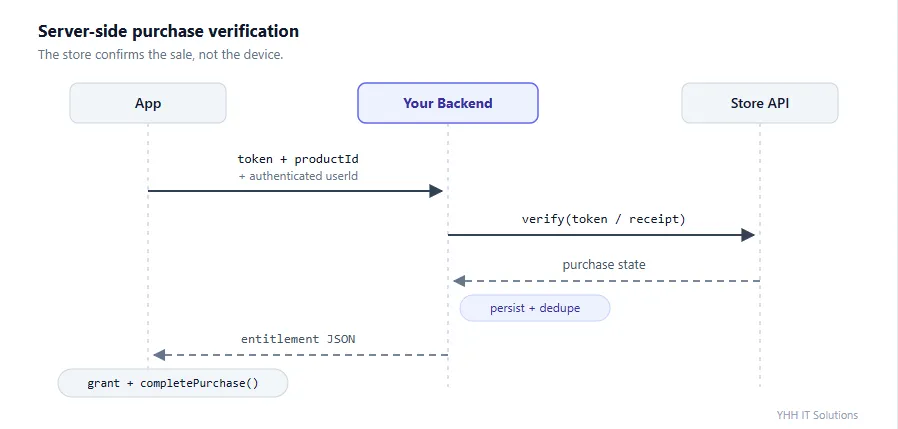
Your backend should return a normalized answer your app can act on without knowing which store it came from:
```
json
{
"entitlement": "pro",
"active": true,
"expiresAt": "20260902T10:15:00Z",
"willRenew": true,
"inGracePeriod": false
}
```
One distinction is worth burning into memory: a purchase token is not an order ID. One subscription keeps the same token across every renewal and gets a new order ID for each charge. Key entitlements on the token, or on Apple's originalTransactionId. Use order IDs for refunds, reconciliation and support lookups.
The Subscription Lifecycle That Breaks Most Apps
A subscription is not simply active or expired. It has states in between, and each has a correct response.
| State | What happened | What your app must do |
|---|---|---|
| Active | Paid and current | Unlock |
| Cancelled | Autorenew turned off | Keep access until the paid period ends |
| Grace period | Payment failed, the store is still retrying | Keep access, and prompt them to fix the payment |
| Account hold on Play | Grace period expired, up to 30 days | Revoke access, but keep their data |
| Paused on Play | User paused voluntarily | Revoke access, resume automatically later |
| Billing retry on Apple | The equivalent of account hold | Revoke unless they are in a grace period |
| Expired or refunded | Over | Revoke immediately |
The two most expensive mistakes are mirror images. Revoking on cancellation locks out a user who paid through the end of the month. Treating expiresAt < now as expired churns a user who is in a perfectly recoverable grace period.
Gate features on a live entitlement check, never on "the user once bought pro_monthly".
```
dart
bool get hasAccess =>
status == 'active' ||
status == 'grace' || // payment failing, keep access
(expiresAt?.isAfter(serverNow) ?? false); // cancelled but paid through
```
Compare against server time, not device time. A user can move their clock forward.
Working offline
Purchases need connectivity. Entitlements should not. Cache the last known entitlement with a timestamp in secure storage, pick a staleness window of 3 to 7 days, and revalidate on reconnect. Be slightly generous: wrongly locking out a paying subscriber on a flight costs far more than a few free days for someone who already churned.
Upgrades, Downgrades and Price Changes
Users move between plans, monthly to yearly, Pro to Premium and back. The two stores differ so much here that this is one of the few places you cannot write one code path.
Apple: the subscription group does it for you
Every auto-renewable subscription belongs to a subscription group, and a user can hold only one active subscription per group. To move someone from monthly to yearly, just sell them the yearly product. The App Store cancels the old one, prorates the refund, and cross-upgrades automatically, with no special parameter and no reference to the old purchase.
This is also why grouping matters. Products in different groups can be bought at the same time, and that is how users end up accidentally paying you twice.
Google: pass the old purchase, or sell a second subscription
Play has no grouping concept. Call buyNonConsumable with a new plan and nothing else, and the user ends up with two active subscriptions billing in parallel. You have to tell Play explicitly that this purchase replaces an existing one.
```
dart
// import 'package:in_app_purchase_android/in_app_purchase_android.dart';
final PurchaseParam purchaseParam = GooglePlayPurchaseParam(
productDetails: proYearly,
changeSubscriptionParam: ChangeSubscriptionParam(
oldPurchaseDetails: currentPurchase, // the live GooglePlayPurchaseDetails
replacementMode: ReplacementMode.withTimeProration,
),
);
await _iap.buyNonConsumable(purchaseParam: purchaseParam);
```
oldPurchaseDetails must be a real GooglePlayPurchaseDetails for a currently active subscription, so keep the last known purchase from restorePurchases() rather than reconstructing one.
The replacement mode decides who pays what and when.
| ReplacementMode | Takes effect | The user is charged | Use it for |
|---|---|---|---|
| withTimeProration | Immediately | New price, with unused time credited as extra days | Default, right for most upgrades |
| chargeProratedPrice | Immediately | The prorated difference now, billing cycle unchanged | Upgrades only |
| withoutProration | Immediately | Nothing now, new price at next renewal | Goodwill upgrades |
| deferred | When the current period ends | New price at that point | Downgrades |
| chargeFullPrice | Immediately | Full price of the new plan, plus remaining old time | Upgrades that reset the cycle |
The rule: upgrade immediately, downgrade deferred. Upgrading with deferred makes users wait weeks for the feature they just paid for. Downgrading immediately with proration hands back money you were owed. (unknownReplacementMode is an unset sentinel, not a choice.)
Confirming a subscription price change
Both stores require the subscriber to consent to a price rise, and a subscriber who never consents simply stops renewing.
Google Play puts existing subscribers into a legacy price cohort when you change a base plan's price, and you choose when to end that cohort. For a decrease, Play notifies users and the lower price applies at the next renewal. For an increase, Play starts notifying 7 days after the cohort ends. Give users notice inside your app before that email arrives, and deeplink them to the Play subscription screen.
Apple shows a price consent sheet inside your app, by default whenever StoreKit likes, which can be mid-purchase or during onboarding. On StoreKit 1, you can register an SKPaymentQueueDelegateWrapper and call showPriceConsentIfNeeded() to defer it to a moment you choose. Recent plugin versions default to StoreKit 2, where there is no payment queue for a delegate to intercept, so check isStoreKit2Enabled before relying on it.
Restoring Purchases
Restore redelivers purchases the user already owns. Apple requires it, and reviewers check for it.
dart
await _iap.restorePurchases();
// Results arrive on purchaseStream as PurchaseStatus.restored
Four rules separate a restore button that works from one that generates support tickets:
- Put it on the paywall and in Settings, visible without scrolling, labelled exactly "Restore Purchases"
- Never require login. The store account is the proof of purchase
- Always show a result, including "No previous purchases found". A silent restore looks broken
- Remind users it only works for the store account that made the purchase
Consumables are never restored by either store. If users need unspent coins across devices, that balance lives on your server or it does not exist.
When the CrossPlatform API Is Not Enough
ProductDetails and PurchaseDetails only expose what both stores share. Eventually you need something only one offers: an introductory price period, a subscription group ID, a winback offer, the raw receipt JSON. There is a documented escape hatch down to the native objects.
First, know which StoreKit you are running
Recent versions of in_app_purchase_storekit default to StoreKit 2 on iOS 15 and later and macOS 15 and later, falling back to StoreKit 1 elsewhere. That default flipped in a breaking change, and it silently changes the runtime types your code receives.
dart
// import 'package:in_app_purchase_storekit/in_app_purchase_storekit.dart';
InAppPurchaseStoreKitPlatform.isStoreKit2Enabled; // check
await InAppPurchaseStoreKitPlatform.enableStoreKit1(); // opt back out
| What you receive | StoreKit 1 | StoreKit 2 |
|---|---|---|
| Product | AppStoreProductDetails | AppStoreProduct2Details |
| Purchase | AppStorePurchaseDetails | SK2PurchaseDetails |
| Native handle | .skProduct and .skPaymentTransaction |
.sk2Product |
This is the quiet failure mode of the whole section. An if (purchaseDetails is AppStorePurchaseDetails) branch written a year ago stops matching entirely once StoreKit 2 becomes the default. It does not throw. The branch just never runs, and whatever it did, whether analytics, receipt logging, or a special-case grant, silently stops. If you type-check platform classes anywhere, audit those checks when you upgrade.
Reaching the native product and purchase objects
```
dart
// Android — import 'package:in_app_purchase_android/in_app_purchase_android.dart';
if (productDetails is GooglePlayProductDetails) {
final offers = productDetails.productDetails.subscriptionOfferDetails;
print(offers?.first.pricingPhases.first.billingPeriod); // e.g. "P1M"
}
if (purchaseDetails is GooglePlayPurchaseDetails) {
print(purchaseDetails.billingClientPurchase.originalJson);
}
```
``` dart
// iOS, StoreKit 2 — import '.../store_kit_2_wrappers.dart';
if (productDetails is AppStoreProduct2Details) {
print(productDetails.sk2Product.subscription?.subscriptionGroupID);
}
final List<SK2Transaction> transactions = await SK2Transaction.transactions();
print(transactions.first.jsonRepresentation);
```
> Guides written for Billing 4 and earlier refer to GooglePlayProductDetails.skuDetails and SkuDetailsWrapper. Those are gone. Billing 5 replaced the flat SKU model with products carrying subscriptionOfferDetails and pricingPhases, so one subscription can describe a trial, an intro price and the standard rate as separate phases. If a snippet mentions skuDetails, everything else in it deserves a second look.
Keep these reads at the edges of your app. The moment a GooglePlayProductDetails cast appears in your paywall widget, you have two paywalls to maintain.
Store-specific offers and offer codes
StoreKit 2 supports offer types that the cross-platform PurchaseParam cannot express, including winback offers for lapsed subscribers and signed promotional offers.
```
dart
// import 'package:in_app_purchase_storekit/in_app_purchase_storekit.dart';
final purchaseParam = Sk2PurchaseParam(
productDetails: productDetails,
winBackOfferId: 'winback_3months_50off',
);
await _iap.buyNonConsumable(purchaseParam: purchaseParam);
```
There is also an Sk2PurchaseParam.fromOffer(...) factory that takes an SK2SubscriptionOffer and wires up the right field for you, whether winback, promotional with its signature, or introductory. That is safer than branching on the offer type by hand.
Offer codes are the redeemable coupons you configure in App Store Connect, the standard tool for winback campaigns, press access and support goodwill. One call brings up Apple's redemption sheet on iOS 14 and later, and it works on both StoreKit paths:
```
dart
final addition =
_iap.getPlatformAddition<InAppPurchaseStoreKitPlatformAddition>();
await addition.presentCodeRedemptionSheet();
```
A redeemed code arrives on purchaseStream like any other purchase, so your existing handler already covers it. Play's equivalent, promo codes, are redeemed in the Play Store app instead.
One more StoreKit 2 call worth knowing: addition.sync() forces a refresh of the device's transaction state against the App Store. It prompts for the user's Apple ID password, so treat it as a "something looks wrong" repair button in Settings, not something to call on launch.
Testing Before You Ship
Google Play. Add license testers under Setup, then License testing, push to the internal testing track and share the optin link. Testers get test cards that always approve, always decline, or approve slowly. Use the slow one deliberately, because it is the only easy way to exercise your pending path.
Apple. Work up the ladder rather than jumping to the top.
| Stage | Tool | Use it for |
|---|---|---|
| 1 | StoreKit configuration file in Xcode | Purchase logic and edge cases; works in the Simulator |
| 2 | StoreKit testing with real product info | Verifying that your catalogue renders |
| 3 | Sandbox accounts | End-to-end testing with server verification |
| 4 | TestFlight | A production-like final pass |
Both stores accelerate subscription renewals for testing. A monthly plan renews in about 5 minutes, a yearly plan in 30 minutes to an hour.
The checklist that catches real bugs:
- Purchase, kill the app, relaunch: the entitlement persists
- Force quit before completion, relaunch: the stream replays it
- Cancel the sheet: the UI resets, no ghost spinner, no error dialog
- Airplane mode mid-purchase: graceful error, retry works
- Reinstall: Restore Purchases returns the entitlement
- Pending purchase: nothing granted until approval
- Refund: the entitlement is revoked
- Cancel a subscription: access lasts until expiresAt, then stops
- Upgrade a plan: exactly one active subscription afterwards, not two
> TestFlight purchases do not carry over to production. A tester who bought Pro in TestFlight has nothing after installing the App Store build. Say so in your release notes.
Cutting the Boilerplate with reusable_iap
Everything above is the same in every app: subscribe once, branch on five statuses, verify, map products to entitlements, complete the transaction, never forget the error path.
We got tired of rebuilding that layer, so we published it. reusable_iap is a headless open-source package from our team that owns exactly that layer and nothing else. No paywall, no branding, no state management dependency. You get a service and a state stream, and the UI stays yours.
```
dart
final iap = IapService(
config: IapConfig(products: {
const IapProductDefinition.subscription('pro_monthly'),
const IapProductDefinition.nonConsumable('remove_ads'),
const IapProductDefinition.consumable('coins_500'),
}),
verifyPurchase: (p) => backend.verify(p),
entitlementResolver: (p) =>
p.productId == 'remove_ads' ? {'no_ads'} : {'premium'},
);
iap.state.listen(render); // FIRST
await iap.initialize();
await iap.loadProducts();
await iap.buy('pro_monthly');
```
It handles the store availability check, the single correctly scoped listener, buy routing by product type, completion after successful verification, restore, and typed errors instead of string matching.
It deliberately does not handle four things: persisting entitlements between sessions, expiring a lapsed subscription, Android upgrade and downgrade flows, and the paywall. Those depend on your backend and your product, and a package that claimed to solve them for every app would be guessing about your revenue. For the store-specific pieces, drop down to the platform APIs shown above.
Frequently Asked Questions
1. Do I have to keep upgrading the Play Billing Library?
Yes, if you want to keep shipping. Each version is supported for two years, and the cutoff always lands on 31 August. After that date, the Play Console rejects new apps and updates built on anything older, though published apps keep working and keep selling. In Flutter, the upgrade is one constraint plus an Android SDK bump, not a rewrite. For the 2026 floor, that is in_app_purchase: ^3.3.0 with minSdk 23 and targetSdk 34.
2. Why is my purchase not showing up in the app?
Almost always one of three things: nothing was listening to purchaseStream when the event fired, completePurchase() was never called so the transaction is stuck, or you are reading a local flag that was never persisted. Check the stream first, because it is the cause about eight times out of ten.
3. What does "Item already owned" mean?
Play Billing response code 7. This account owns a purchase of that product that was never consumed. Either you called buyNonConsumable for something meant to be repeatable, or you never completed the previous purchase. Call restorePurchases(), complete or consume it, then let the user buy again.
4. How much does it cost to add in-app purchases to an app?
The store's cut is 15 to 30 percent of each sale. Build cost depends on whether you need only the client flow or the full stack, meaning server-side verification, entitlement storage, and store notification handling. A single nonconsumable unlock is a small piece of work. A subscription business with trials, upgrades, and refund handling is a proper project. We scope it against what you are actually selling.
5. Do I need a backend server for in-app purchases?
For a one-off unlock in a small app, you can survive without one. For anything recurring, yes. Only your server can know whether a subscription is still active, because renewals, refunds, and billing failures happen while the app is closed. Store notifications are delivered to a server, not to a phone.
6. Can I use my own payment gateway and skip the commission?
Only through opt-in, region-gated programs from Google and Apple, and only for digital goods in specific markets. They trim a few percentage points, not the whole commission, and hand you payment processing, tax remittance, chargebacks, and compliance reporting in return. Physical goods and real-world services must not go through IAP.
> This guide is verified and updated by Bimal Khatri and Sudip Poudel, Mobile App Developer at YHH IT Solutions. He builds and ships Flutter apps to Google Play and the Apple App Store as part of our app team. Every version number, deadline, and code sample in this guide was checked against the current Play Billing and StoreKit documentation in September 2026, and is reviewed again each year when Google raises the Billing Library floor.
Our Services
Inapp purchases look like a two-day task and behave like a two-month one. The purchase sheet is the easy part. What takes the time is everything the user never sees: server-side verification, entitlement modelling, grace periods, refunds, store notifications, offline behaviour, and a support path for the day a paying customer emails you.
YHH IT Solutions is a mobile app development company based in Pokhara, Nepal. We build Android and iOS apps for businesses here and abroad, and we do not only build them for clients.
We also build and run our own. Digital Patro is our Nepali calendar app, live on both Google Play and the Apple App Store, with dates, festivals, holidays, horoscopes, forex rates, and news in one place. Running our own app on both stores means we deal with the same review queues, release deadlines and billing rules described in this guide, on our own product, every single release. That is where most of the advice above comes from.
Alongside app development, we provide:
- Mobile App Development
- Web Development
- Software Development
- Search Engine Optimization (SEO)
- IT Consulting
- Social Media Management
- Digital Marketing
- UI/UX and Branding Design
- Graphic Design
You can see the full range on our services page. If you are planning a paid app, or you have one already selling and are not confident the billing layer is right, get in touch for a review.
"One team. One vision. Real results."
Sources and Further Reading
- [Play Billing Library release notes](https://developer.android.com/google/play/billing/releasenotes)
- [Play Billing deprecation FAQ](https://developer.android.com/google/play/billing/deprecationfaq)
- [Apple InApp Purchase](https://developer.apple.com/inapppurchase/) and the [App Store Server API](https://developer.apple.com/documentation/appstoreserverapi/)
- [in_app_purchase on pub.dev](https://pub.dev/packages/in_app_purchase)
- [in_app_purchase_android changelog](https://pub.dev/packages/in_app_purchase_android/changelog), where Billing Library bumps land first
- [in_app_purchase_storekit changelog](https://pub.dev/packages/in_app_purchase_storekit/changelog), covering the StoreKit 2 default and offers
- [Play subscription replacement modes](https://developer.android.com/google/play/billing/subscriptionsreplacementmodes)
- [reusable_iap on GitHub](https://github.com/yhhitsolutions/reusable_iap)
Verified as of September 2026. The version numbers here age by design, because Google raises the Play Billing floor every year and Apple revises StoreKit with each iOS release. Treat them as an example of the pattern and check the release notes above for today's numbers. The flow, the failure modes, and the fixes have not changed in years.